
Bluetooth not Working on Android
If want to make sure Bluetooth is working correctly, you need to make sure your bluetooth settings are correct. First make sure that you have bluetooth enabled in you configuration screen.
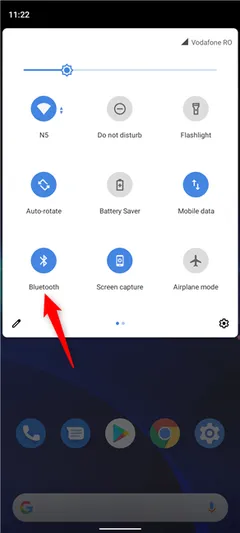
Second, make sure your Eco Planeta IQ has location permissions enabled. Without this Eco Planeta IQ won’t work.
-
Go to your the Settings app.
-
Tap Apps
-
Select Eco Planeta IQ
-
Set Location Permission to Allowed All the Time.
If you have bluetooth enabled and the Location Permission for Eco Planeta IQ enabled your android phone should work with bluetooth as well.
Still need help? Email info@ecoplaneta.com or visit ecoplaneta.com.
Privacy policy